





Amazon Counter Pickup for UK Shopify Stores
Via.Delivery adds Amazon Counter pickup locations to your Shopify checkout in the UK. Shoppers choose a nearby Amazon Counter next to your other delivery options, the order arrives in Linnworks addressed to that counter, and you print the Amazon Shipping label the same way you print labels for your other carriers. The parcel travels with Amazon Shipping, and the shopper collects it at the counter.
This integration is for online stores shipping within the United Kingdom. For U.S. stores, see Pickup at Checkout with FedEx and UPS pickup locations.
This integration is for online stores shipping within the United Kingdom. For U.S. stores, see Pickup at Checkout with FedEx and UPS pickup locations.
Key facts
- Amazon Counter locations in the UK, shown in your Shopify checkout as their own delivery option, with each counter's address and distance.
- Built for Shopify + Linnworks. The chosen counter becomes the delivery address on the order in Linnworks.
- Amazon Shipping labels from Linnworks: Print, then Shipping label, on the order or on a batch of orders.
- No new workflow for your warehouse. Pickup orders sit in the same Linnworks queue as every other order.
- You set the price. The pickup option shows at the rate you choose, next to your standard delivery.
How it works
- The shopper picks an Amazon Counter at checkout. An "Amazon Hub" delivery option appears next to your other rates. It lists the nearest Amazon Counters, such as Post Office branches and local shops, with their address, distance and the Amazon Shipping transit time.
- The order syncs to Linnworks. It arrives with the Via.Delivery (Amazon UK) shipping service, and the selected Amazon Counter as the delivery address. The shopper's name stays on the order as the recipient.
- You print the Amazon Shipping label. In Linnworks, open the order (or select several) and choose Print, Shipping label, then Print or Print to PDF.
- Amazon Shipping delivers to the counter. The parcel goes out with your other shipments and travels to the Amazon Counter the shopper chose, where they collect it.
Step 1: Amazon Counter pickup in your Shopify checkout
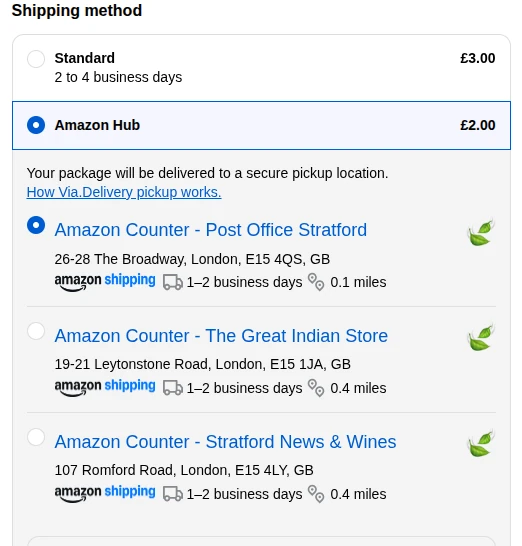
The shopper sees Amazon Counter pickup as one more delivery option. When they select it, the nearest counters appear, closest first. In this example from our UK test store, the closest counter is 0.1 miles away, with a 1 to 2 business day Amazon Shipping transit time. The shopper chooses one and pays as usual.
Step 2: The order arrives in Linnworks
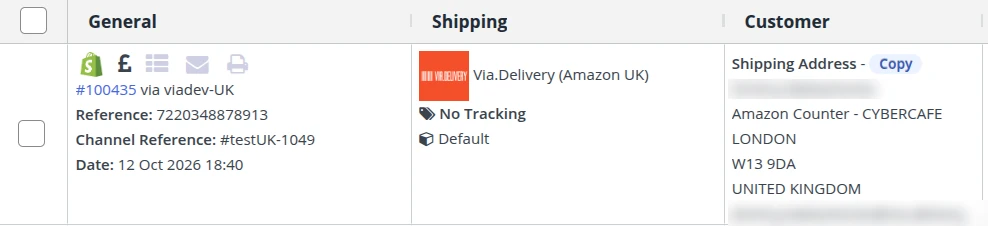
The order comes into Linnworks from Shopify like any other order. Two things tell your team it's a pickup order:
- Shipping service: Via.Delivery (Amazon UK), so it's clear which label to print.
- Shipping address: the Amazon Counter the shopper chose, with the shopper's name as the recipient.
Step 3: Print the Amazon Shipping label
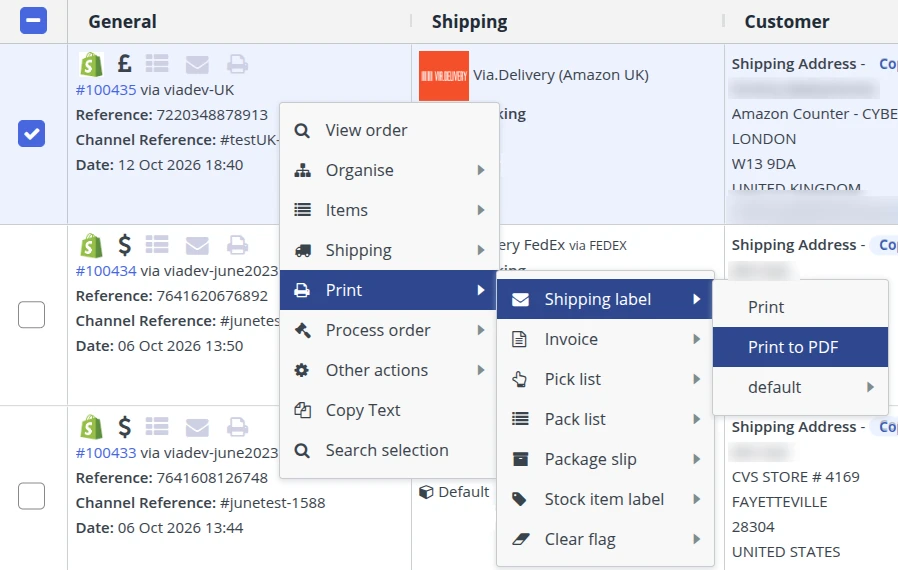
From the order, or a batch of selected orders, choose Print > Shipping label > Print or Print to PDF. This is the same place your team prints labels for your other carriers. Pack the parcel and hand it over with the rest of your Amazon Shipping parcels.
Why offer Amazon Counter pickup
- Pickup in shops shoppers already visit. Amazon Counters are inside local shops, such as Post Office branches and newsagents.
- Fewer missed deliveries. The parcel waits at the counter instead of on a doorstep or with a neighbour.
- No extra work for your team. The order, the label and the dispatch all stay in Linnworks.
Home delivery vs. Amazon Counter pickup
| Home delivery | Amazon Counter pickup | |
|---|---|---|
| Where the parcel goes | The shopper's address | An Amazon Counter the shopper chooses |
| Someone needs to be in | Often, or the parcel is left outside | No, it waits at the counter |
| How your team ships it | Your usual carrier label | An Amazon Shipping label printed in Linnworks |
| How it shows in Linnworks | Your usual shipping service | The Via.Delivery (Amazon UK) service |
What you need
- A Shopify store selling to UK shoppers.
- Linnworks, with your Shopify store connected as an order channel.
- A short setup call with our team. We connect the Via.Delivery app to your store and to Linnworks, and test an order with you.
FAQ
Which countries does this integration cover?
The United Kingdom. Shoppers choose from Amazon Counter locations in the UK. For U.S. stores, Via.Delivery offers FedEx and UPS pickup locations; see Pickup at Checkout.
Which store platform and order management system does it work with?
Shopify for the checkout and Linnworks for order management and labels.
How does my team know an order is for an Amazon Counter?
In Linnworks the order shows the Via.Delivery (Amazon UK) shipping service, and the shipping address is the Amazon Counter the shopper chose.
How do we print the label?
In Linnworks: Print, then Shipping label, then Print or Print to PDF, for a single order or a batch.
Can I choose what shoppers pay for pickup?
Yes. You set the rate for the pickup option, just like your other delivery options.
How long does setup take?
We set it up with you on a short call: we connect the app to Shopify and Linnworks, then run a test order together.