





Via.Delivery for Odoo: Pickup Locations at Checkout
The Via.Delivery module for Odoo adds FedEx Hold at Location and UPS Access Point pickup locations to your Odoo eCommerce checkout. Shoppers pick a nearby pharmacy, grocery store or shipping center as their delivery method, the order ships there with FedEx or UPS, and they collect it when it suits them. You keep shipping from your own warehouse, and you don't need a physical store.
The module is in early access for Odoo 19. Book a call to join, or email info@via.delivery.
The module is in early access for Odoo 19. Book a call to join, or email info@via.delivery.
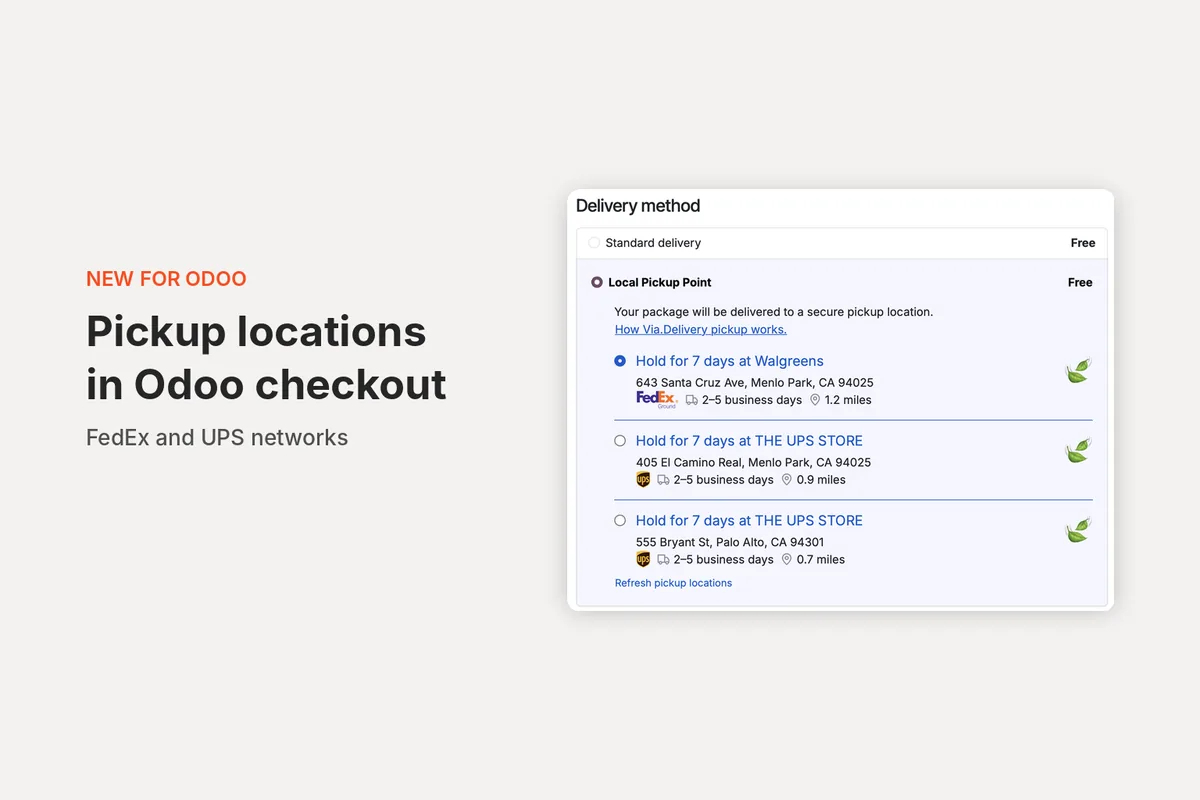
Key facts
- Both networks in one list: FedEx and UPS pickup locations, 36,000+ across the U.S., including pharmacies, grocery and convenience stores, FedEx Office and The UPS Store locations. See the pickup locations map.
- Built for Odoo 19 eCommerce, on Odoo.sh or self-hosted Odoo.
- A delivery method like any other: pickup shows up as "Local Pickup Point" next to your other delivery methods, at the rate you set.
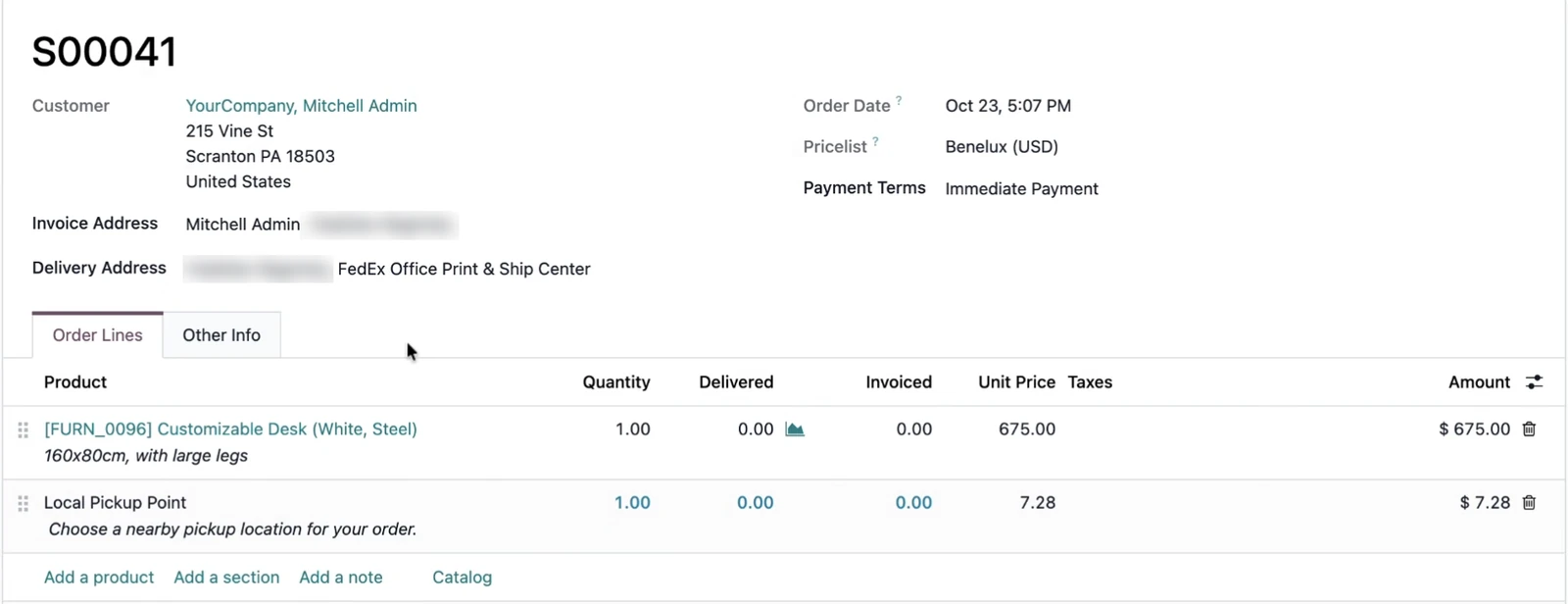
- The order is ready to ship: the chosen location becomes the order's delivery address in Odoo.
- Labels your way: ship pickup orders with labels from Via.Delivery, or keep using your own FedEx or UPS setup.
- Packages held for 7 days, with email and text reminders until the customer picks up.
- Early access: we install and set up the module with you.
What shoppers see at checkout
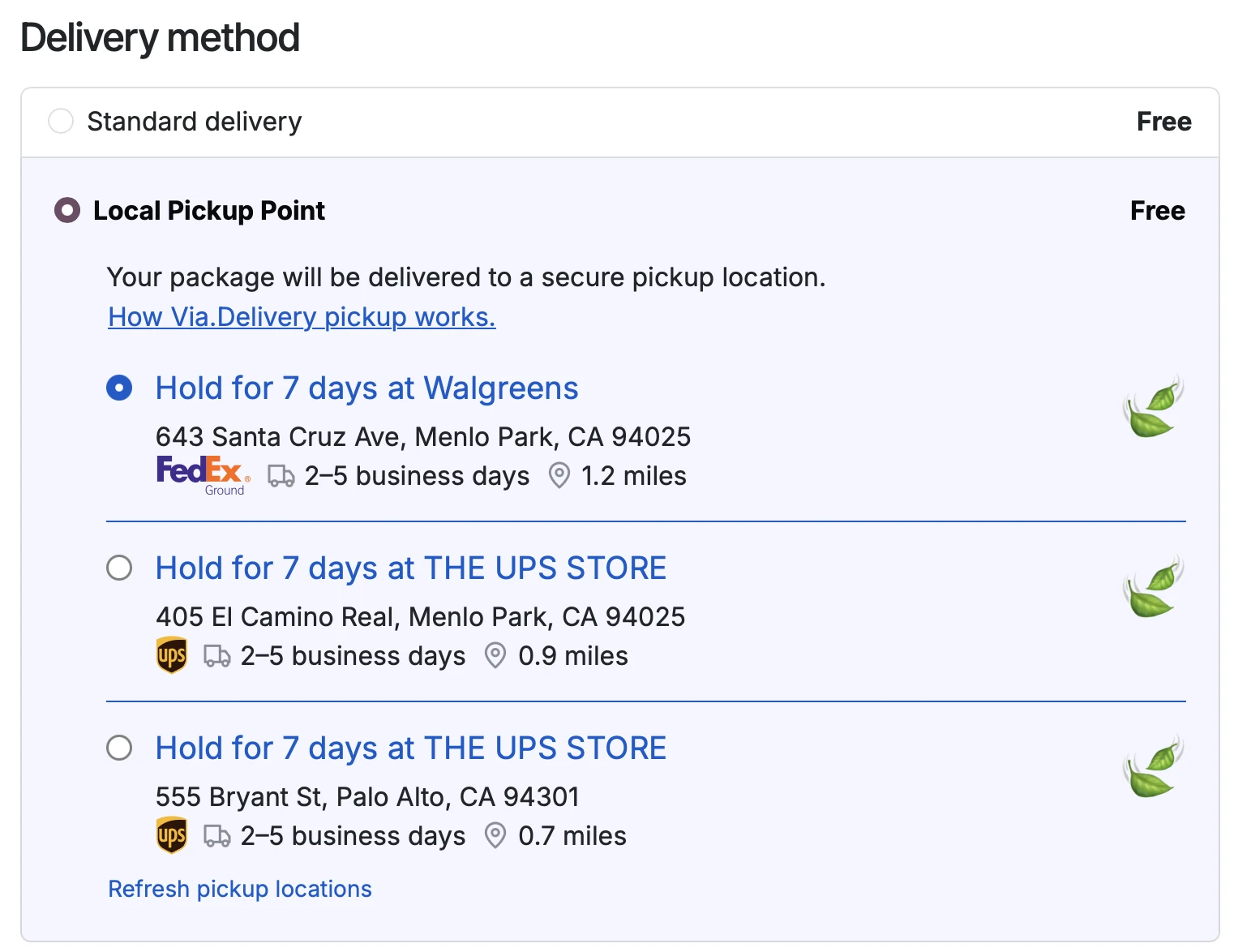
When a shopper chooses Local Pickup Point in the delivery step, the checkout lists the pickup locations nearest to their address. For each one they see:
- the store name and address, and how long the package is held (7 days);
- the carrier, FedEx or UPS;
- the estimated delivery time, for example 2 to 5 business days;
- the distance from their address.
Across stores using Via.Delivery, between 7% and 16% of shoppers choose pickup on average when it's offered, depending on the product category (Via.Delivery data). More on Pickup at Checkout.
What you see in Odoo
The sales order comes in with the pickup location as the delivery address and a Local Pickup Point delivery line, so your team ships it like any other order. The customer gets notifications when the package is on its way and when it's ready, then reminders until they collect it.
Shipping and labels
Pickup orders go out as FedEx Hold at Location or UPS Access Point deliveries. You choose how to ship them:
| Labels from Via.Delivery | Your own FedEx or UPS setup | |
|---|---|---|
| Who creates the label | Via.Delivery, for the chosen pickup location | Your existing FedEx or UPS shipping in Odoo |
| Carrier account | Via.Delivery's rates for pickup deliveries, or your account | Your account and rates |
| Best for | Stores that want pickup labels handled for them | Stores with an established FedEx or UPS workflow |
We go through the options on the setup call. See pricing for the per-order options.
How to get started
- Book a call. We check your Odoo version and hosting, and how you ship today.
- We install the module on your Odoo database and connect it to your Via.Delivery account.
- Set up the delivery method. Choose the rate shoppers see for Local Pickup Point and how pickup orders are labeled.
- Test and go live. We place a test order with you, check the label and the customer notifications, then turn pickup on for your shoppers.
FAQ
Which Odoo versions does the module support?
Odoo 19 eCommerce, on Odoo.sh or self-hosted Odoo. If you run an earlier version, book a call and tell us which one.
Does it show both FedEx and UPS locations?
Yes. Shoppers see the nearest FedEx and UPS pickup locations in one list, with the carrier marked on each.
Do I need a physical store?
No. The pickup locations are FedEx and UPS sites such as pharmacies, grocery stores and shipping centers, so online-only stores can offer in-person pickup.
Can I keep my own FedEx or UPS account?
Yes. You can keep shipping with your own FedEx or UPS setup, or use labels and rates from Via.Delivery for pickup orders.
How long is a package held?
7 days from arrival at the pickup location. The customer gets a notification when it's ready, then reminders until they collect it.
How do I get the module?
The module is in early access, and we install it with you. Book a call or email info@via.delivery.
Not ready for a call?
Get the Via.Delivery Shipping Brief: short reads on carrier fees, holiday cutoffs and pickup options for online stores and wineries, twice a month.
No spam. Unsubscribe anytime.