





Pickup Locations for Commerce7 Wineries
Via.Delivery's Commerce7 app gives your customers a pickup option at every point where wine delivery can go wrong. One-time buyers can choose a nearby FedEx or UPS pickup location at checkout. Club members, who never go through checkout, get the offer by email and text before their release ships, and can save it for every future release. Each pickup order is updated in Commerce7 and ships through your usual fulfillment, as a FedEx Hold at Location or UPS Access Point delivery.
Just launched? Use our launch kit for Commerce7 wineries to announce pickup to your club members and customers.
Just launched? Use our launch kit for Commerce7 wineries to announce pickup to your club members and customers.
Key facts
- About 20,000 FedEx and UPS locations that accept wine across the U.S. Customers only see locations that accept alcohol, and they show ID (21+) at the counter.
- Every Commerce7 order type: web orders at checkout, plus web, club, POS and admin orders after they're placed.
- Up to 35% of club members and subscribers have signed up to have their shipments redirected to pickup.
- About 55% of customers who switch an order to pickup save that choice for future orders.
- NPS 70+ from customers who used it.
- Packages are held for 7 days, with email and text reminders until the customer picks up.
Three places customers can choose pickup
| Pickup at checkout | Thank-you page offer | Email and text offer | |
|---|---|---|---|
| When | While placing a web order | Right after a web order is placed | After any order is created, before it ships |
| Commerce7 orders | Web | Web | Club, web, POS and admin |
| Best for | One-time online buyers | Buyers who chose home delivery | Club releases and subscriptions |
| Can apply to future orders | Per order | Per order | Yes, with "save for future orders" |
If a home delivery attempt still fails, Missed Delivery Redirect offers the customer a pickup location instead of another attempt or a return.
1. Pickup locations at Commerce7 checkout
Buyers on your Commerce7 store see nearby FedEx and UPS pickup locations in the list of shipping options at checkout, next to your other rates. They pick a location before they pay, and the order ships straight there. For wine, the list only includes locations that accept alcohol.
How many buyers choose pickup when it's offered at checkout, across stores using Via.Delivery (Via.Delivery data): 12% to 26% of buyers of wine and other signature-required products, 16% on average, the highest share of any product category we measure.
How many buyers choose pickup when it's offered at checkout, across stores using Via.Delivery (Via.Delivery data): 12% to 26% of buyers of wine and other signature-required products, 16% on average, the highest share of any product category we measure.
2. The pickup offer on the thank-you page
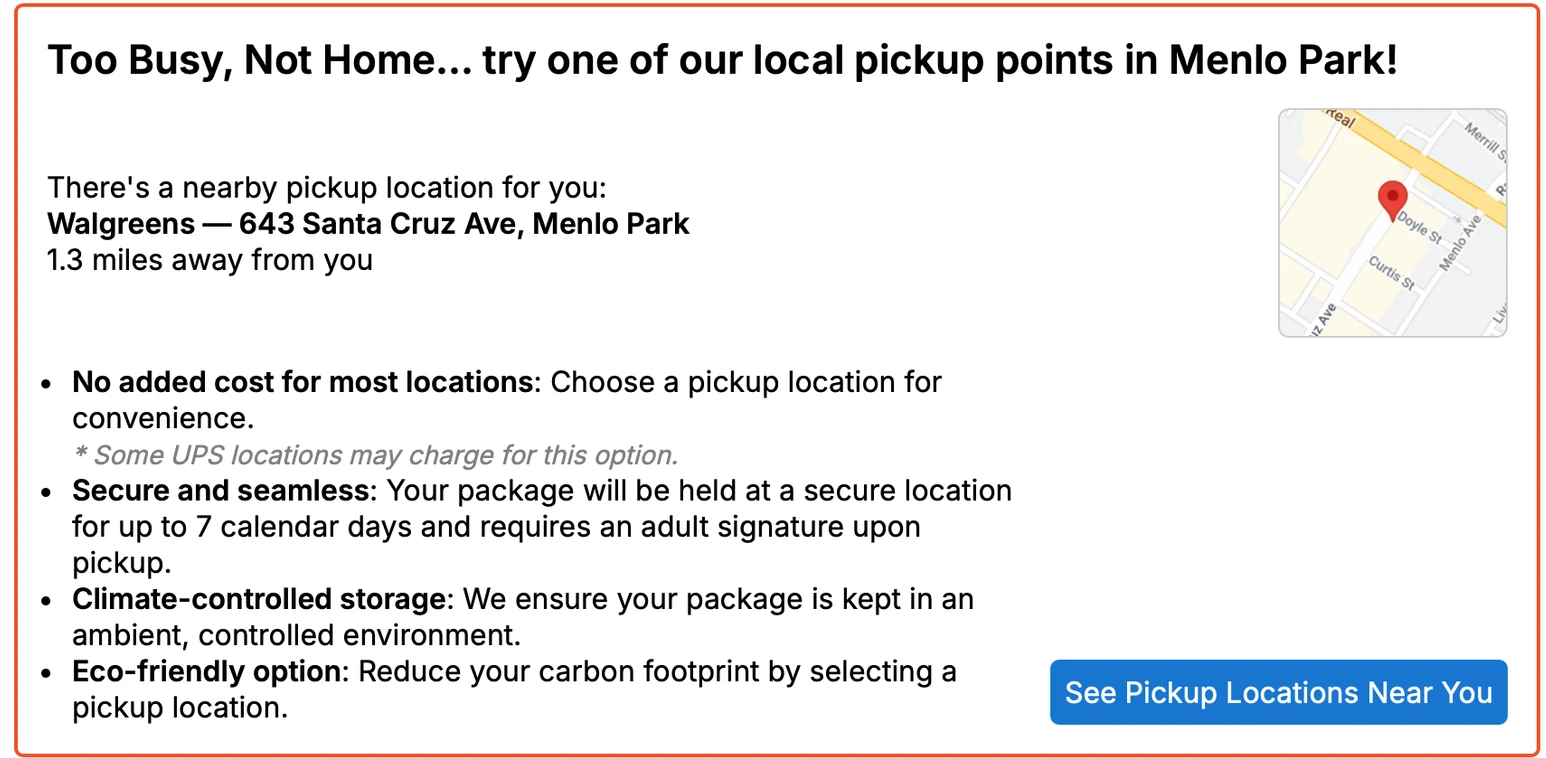
Right after a web order is placed, the thank-you page shows the nearest pickup location, its distance and a small map, with a button to see other locations nearby. A buyer who chose home delivery at checkout can still switch to pickup in a click, before the order ships.
3. The offer by email and text, including club orders
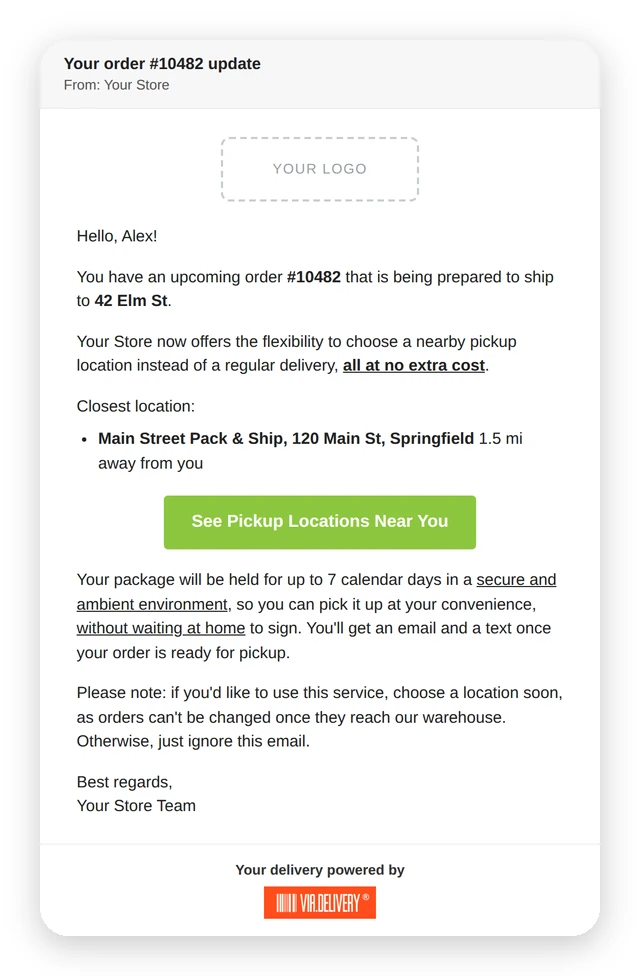
Club releases are charged automatically, so club members never see a checkout. When any new order is created in Commerce7, including club, POS and admin orders, Via.Delivery sends the customer an email and a text in your winery's name. It names the closest location that accepts wine, and links to a page where they can choose it or keep home delivery.
The page where customers choose a location
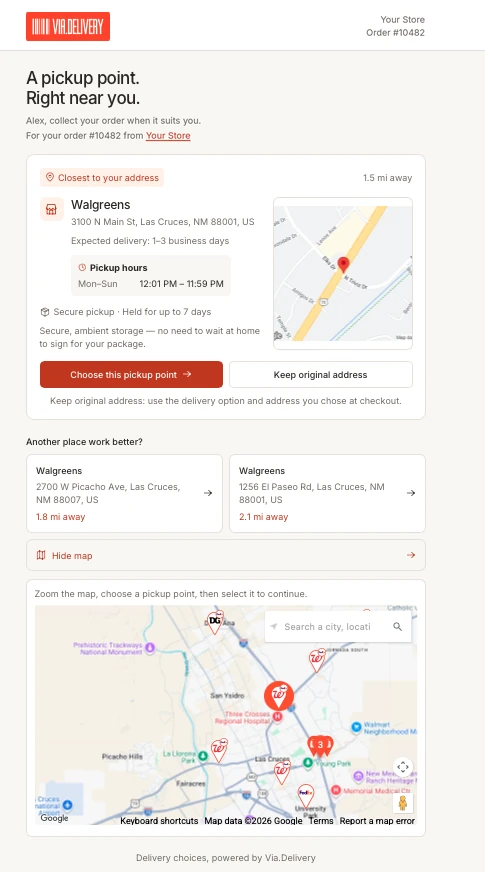
The link opens a page built for a phone:
- The closest location first, with its distance, pickup hours and expected delivery time.
- Two clear buttons: "Choose this pickup point" or "Keep original address".
- Two nearby alternatives, and a full map with search for any other location.
- Only locations that can take the package: we check its weight and dimensions, and for wine we only show locations that accept alcohol.
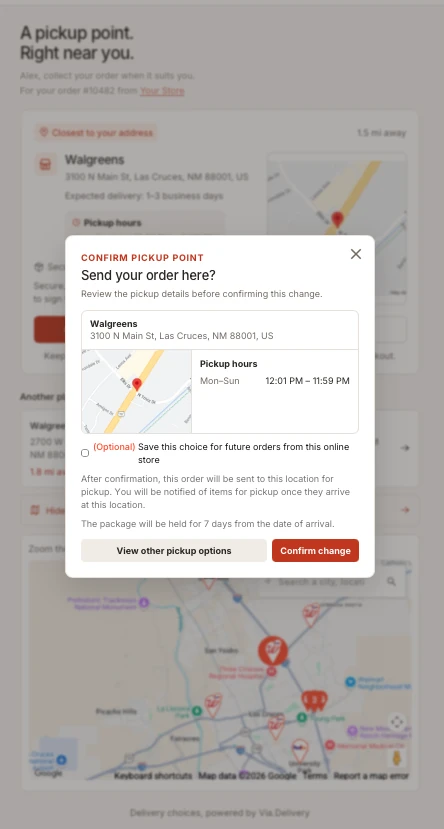
When the customer confirms, they can check "Save this choice for future orders from this online store." From then on, every new order from your winery, including each club release, goes to that location automatically. About 55% of customers who switch to pickup check this box.
What you see in Commerce7
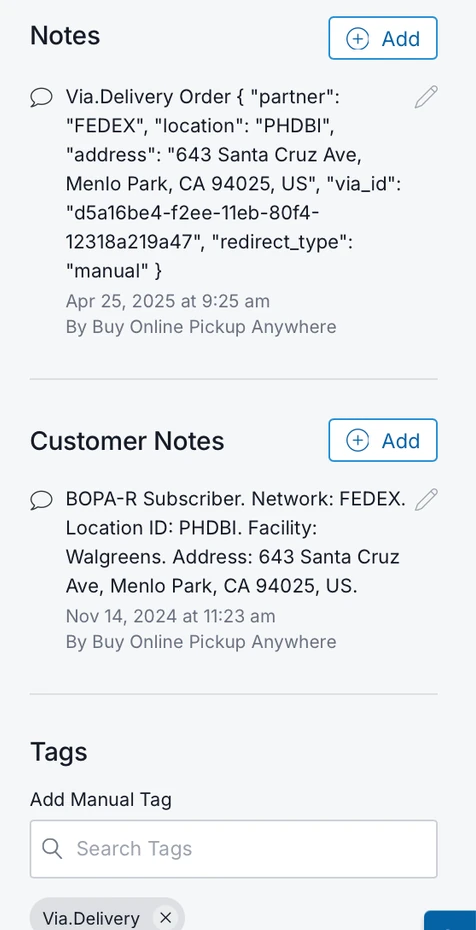
You don't need to check another system to know which orders go to pickup:
- Order note: the carrier (FedEx or UPS), the location ID and the pickup address.
- Customer note: customers who saved their choice are marked as pickup subscribers, with their location.
- Tag: pickup orders are tagged "Via.Delivery", so you can filter and report on them.
- Shipping: the order is switched to a FedEx Hold at Location or UPS Access Point delivery before it ships, so your fulfillment team or 3PL ships it like any other order.
Notifications, from order to pickup
| When | What the customer gets | Applies to |
|---|---|---|
| The order is placed | The pickup offer on the thank-you page | Web orders |
| A new order is created in Commerce7 | An email and text offering nearby pickup locations | Club, web, POS and admin orders |
| The package arrives at the location | A "ready for pickup" email and text | Every pickup order |
| The package is waiting | Reminders by email and text at 5, 3 and 1 days left | Packages not yet picked up |
| The package is picked up | An email asking why they chose pickup, with an NPS question | Picked-up packages |
| 7 days pass without pickup | A "Why didn't you pick up your package?" email | Packages not picked up |
The answers and pickup data show up in your Via.Delivery dashboard.
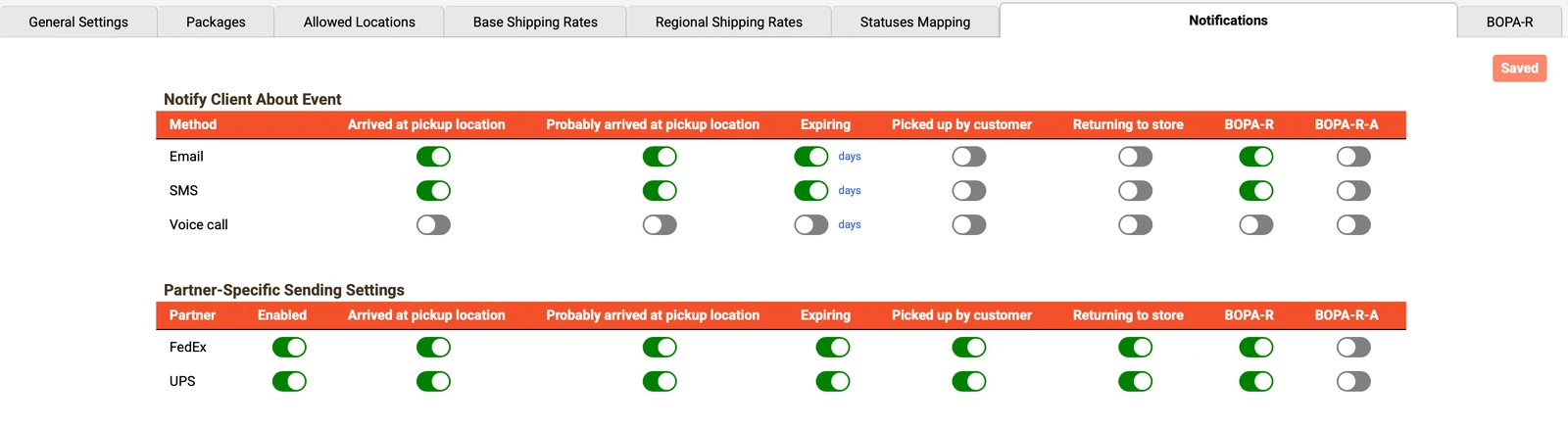
Every notification is controlled in your Via.Delivery dashboard: turn each event on or off by email, text or voice call, and set it separately for FedEx and UPS.
Works with your fulfillment partner
Many Commerce7 wineries ship through a wine fulfillment partner. Pickup orders go out like any other order, through:
- Wine fulfillment partners: Wineshipping, WeShipExpress, Copper Peak Logistics, Wine Country Connect, WineCub and BeyondVino.
- Order management and fulfillment software: ShipStation, ShipHero and Fort Systems.
Announce it to your members
Members are more likely to use pickup when they hear about it before the next release. Our launch kit for Commerce7 wineries has ready-to-send copy for a club email, a website banner and a social post, plus a plain-language explanation of how pickup works that you can share with members.
FAQ
Is Via.Delivery an official Commerce7 app?
Yes. Via.Delivery has had an app for Commerce7 for several years.
Can customers choose a pickup location at Commerce7 checkout?
Yes. Buyers see nearby FedEx and UPS pickup locations in the list of shipping options at checkout and choose one before they pay.
Does it work for wine club orders?
Yes. Club orders skip checkout, so members get the pickup offer by email and text after the order is created and before it ships. They can save their choice for every future release.
Which order types are covered?
Web orders get pickup at checkout and on the thank-you page. Club, web, POS and admin orders get the email and text offer.
Which pickup locations accept wine?
About 20,000 FedEx and UPS locations across the U.S. accept alcohol, and only those are shown for wine. The recipient must be 21 or older and show ID at pickup.
How long is a package held at the pickup location?
7 days from arrival. The customer gets a "ready for pickup" message, then reminders at 5, 3 and 1 days left.
Can I turn notifications on or off?
Yes. Each notification can be switched on or off by email, text or voice call in your Via.Delivery dashboard.