





Announce Pickup Locations to Your Wine Club
You've turned on Via.Delivery for your Commerce7 store. Members are far more likely to use pickup when they hear about it from you before their next release, rather than meeting it for the first time in an email about their order. Enter your winery's details below to get a club email, a note for all customers, a paragraph for your shipping policy page, a social post, FAQ answers and graphics, all with your name and website already in place.
New to the app? See how Via.Delivery works with Commerce7.
New to the app? See how Via.Delivery works with Commerce7.
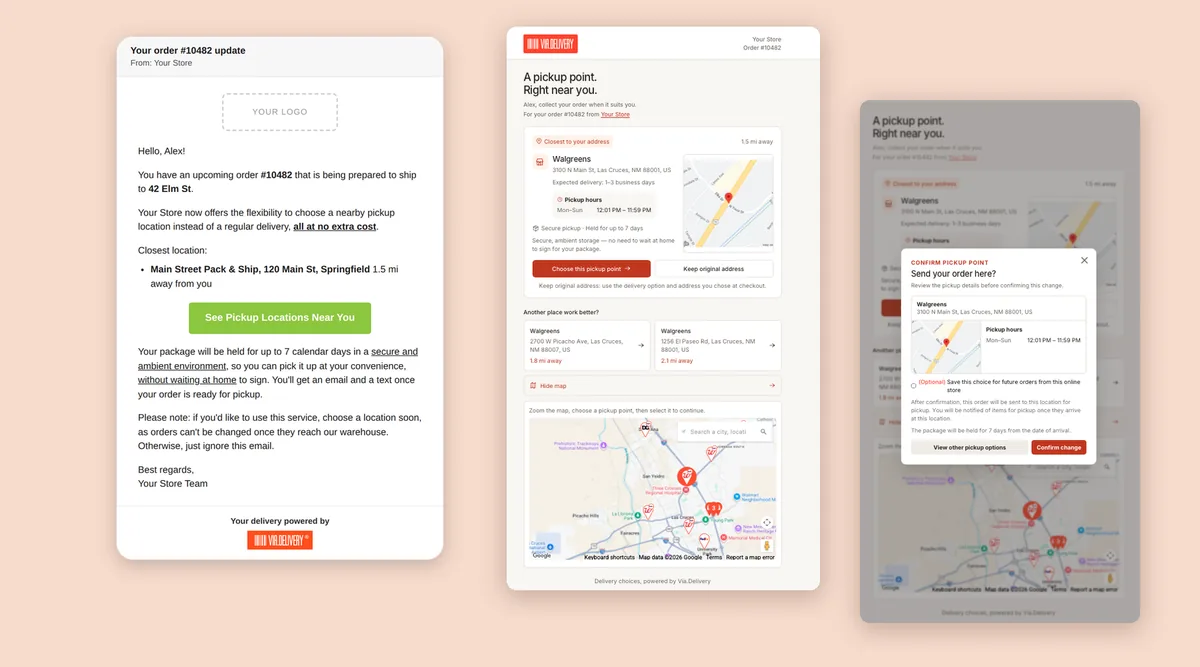
Launch checklist
- Confirm your settings. In your Via.Delivery dashboard, check which notifications are on and what pickup costs your customers.
- Add the pickup paragraph to your shipping policy page, or to your shipping FAQ. That's where customers look before they order.
- Email your club members 1 to 2 weeks before the next release. Club members are the ones who can't choose a delivery option at checkout, so this is the most important step.
- Add the banner to your website and post on social media the week of the release.
- Tell your tasting room team. Members often ask in person; the short version is in "How pickup works for your members" below.
- Check your first release. Watch how many members switch and save their location, and send a reminder to members who haven't opened the email.
Your launch kit
Fill in your winery's details once. Every template and graphic below updates as you type, ready to copy or download. Nothing you type leaves your browser.
Shipping policy paragraph for your website
Add this to your shipping policy or shipping FAQ page, where customers look before they order. Paste it with the links, or copy the HTML code into your site editor.
Shipping page section
Emails
Send the club email 1 to 2 weeks before your next release, so members hear about pickup from you before the pickup offer for their order arrives.
Email to club members
Email or newsletter note to all customers
Website banner and social post
Website banner text
Social media post
FAQ answers
Pickup questions and answers
Graphics
Ready-made images that show the pickup page your customers will see, with your winery's name on it: an email header, a website banner, a square social post and a story. Add your logo and pick colors that match your brand, then download each PNG.
How pickup works for your members
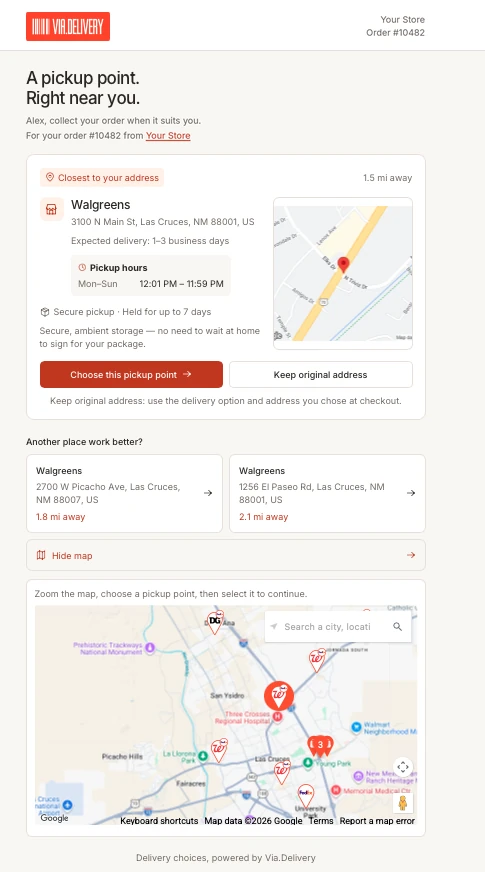
This is what your members see in our Pickup Redirect flow, so your team can answer questions with confidence:
- Before the release ships, they get an email and a text in your winery's name, with the closest pickup location that accepts wine.
- They tap the link and see that location first, with its distance, pickup hours and expected delivery, plus two alternatives and a map to search for any other location.
- They choose "Choose this pickup point" or "Keep original address". If they do nothing, the order ships to their home as usual.
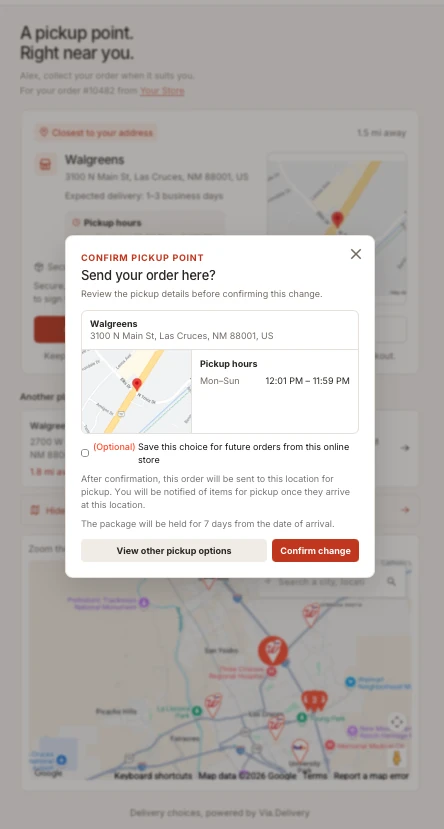
- They can save the choice for every future release with one checkbox when they confirm.
- They're told when the package arrives, and get reminders at 5, 3 and 1 days left. The package is held for 7 days.
- They pick it up with a photo ID showing they're 21 or older.
Buyers on your website can also choose a pickup location at checkout, next to your other shipping options. To see where the pickup locations are, use our pickup locations map. For wine, members only see the locations that accept alcohol.
What you can expect
- Wineries using Via.Delivery have seen up to 35% of club members and subscribers sign up to have their shipments redirected to pickup.
- About 55% of customers who switch an order to pickup save that choice for future orders.
- Customers who used it rate it NPS 70+.
FAQ
When should we announce pickup to club members?
One to two weeks before your next club release, so members hear about it from you before they get the pickup offer for their order.
Do members have to do anything if they want home delivery?
No. If they ignore the email or tap "Keep original address", the order ships to their home as usual.
Why add a paragraph to our shipping policy page?
Customers check the shipping page before they order, especially for wine, where someone 21 or older has to sign. A short paragraph there tells them pickup is an option and how it works.
What does the member need at pickup?
A photo ID showing they're 21 or older. The package is held for 7 days from arrival.
Is the information we type into the launch kit stored anywhere?
No. The templates and graphics are made in your browser. Your browser remembers what you typed on this device so you can come back to it; nothing is sent to Via.Delivery.
Can we change the wording of the emails and texts members receive from Via.Delivery?
The messages go out in your winery's name. Talk to our team about your branding and wording, and turn each notification on or off in your Via.Delivery dashboard.