





Does Shopify Protect Cover Orders to Pickup Locations?
Key Takeaways
- Shopify Protect is free but narrow: it covers fraudulent and unrecognized chargebacks only on Shop Pay orders, for US merchants using Shopify Payments.
- Changing the shipping address after checkout voids coverage for that order. That's the rule high-value stores worry about when they add pickup locations.
- In-store pickup isn't covered. Orders shipped by a supported carrier with valid tracking can be, including orders going to a carrier pickup point, as long as the address isn't edited after checkout.
- A carrier reroute after shipment is a known fraud pattern. Merchants have reported packages redirected to a pickup counter after the label was printed.
- Pickup chosen at checkout is different: the store decides which orders can use it, and the destination is fixed before the order exists.
- One luxury resale store we work with now offers pickup on Shop Pay orders, and Shopify confirmed those orders are protected. Every store should check its own orders the same way.
Share:
Why this question keeps coming up
If you sell handbags, watches, jewelry or other items worth thousands of dollars, two things keep you up at night: packages left on a doorstep, and chargebacks from stolen cards. Pickup locations solve the first. Shopify Protect handles the second. The question we hear most from high-value Shopify stores is whether they can have both.
Here's a real example. A luxury designer resale store (we're not naming it) sells pieces with an average order of about $1,500, and some bags cost far more. About half of its orders are paid with Shop Pay. The store wanted to offer FedEx and UPS pickup because it "would save us money, sounds safer and more convenient for customers," in the owner's words, followed by the deal-breaker: "But we can't lose Shopify Protect."
They had a reason to be careful.
Here's a real example. A luxury designer resale store (we're not naming it) sells pieces with an average order of about $1,500, and some bags cost far more. About half of its orders are paid with Shop Pay. The store wanted to offer FedEx and UPS pickup because it "would save us money, sounds safer and more convenient for customers," in the owner's words, followed by the deal-breaker: "But we can't lose Shopify Protect."
They had a reason to be careful.
The $7,800 bag: how a reroute turned into a chargeback
The store shipped a $7,800 designer bag to the cardholder's home address. The order was paid with Shop Pay and covered by Shopify Protect.
After UPS picked up the package, someone used a UPS My Choice account to reroute it to a UPS Access Point and collected it there. The real cardholder, most likely a victim of identity theft, disputed the charge and won the chargeback.
Because the order was protected, Shopify reimbursed the store. Without Shop Pay and Shopify Protect, the store would have lost the bag and the money.
This store isn't the only one. In an August 2024 Shopify Community post, a merchant warned that UPS recipients can change the delivery address after shipment without the shipper's involvement, and later wrote that two rerouted orders had cost them $3,500. UPS's own "Change a Delivery" page confirms recipients can hold a package for pickup at a UPS location and, in certain cases, reroute it, though "some packages are not eligible" for an address change because of shipper restrictions, package status or security requirements.
The lesson for the store was clear: Shopify Protect is what saved them, so nothing could put it at risk.
After UPS picked up the package, someone used a UPS My Choice account to reroute it to a UPS Access Point and collected it there. The real cardholder, most likely a victim of identity theft, disputed the charge and won the chargeback.
Because the order was protected, Shopify reimbursed the store. Without Shop Pay and Shopify Protect, the store would have lost the bag and the money.
This store isn't the only one. In an August 2024 Shopify Community post, a merchant warned that UPS recipients can change the delivery address after shipment without the shipper's involvement, and later wrote that two rerouted orders had cost them $3,500. UPS's own "Change a Delivery" page confirms recipients can hold a package for pickup at a UPS location and, in certain cases, reroute it, though "some packages are not eligible" for an address change because of shipper restrictions, package status or security requirements.
The lesson for the store was clear: Shopify Protect is what saved them, so nothing could put it at risk.
What Shopify Protect covers, and what voids it
From Shopify's Help Center:
- Who can use it: you "must be located in the United States and have a United States Shopify Payments account." It's free.
- Which orders: only orders processed through Shop Pay. Shop Pay Installments orders aren't eligible, and only the first order of a subscription is covered.
- What you get: for a fraudulent or unrecognized chargeback on a protected order, "the disputed amount and the chargeback fee are immediately reimbursed to you as a credit." Other chargeback types, such as item not received or defective, aren't covered.
- Shipping rules: the order must be fulfilled with valid tracking from a supported carrier (UPS, FedEx and USPS are on the list) within 7 days, and be in transit within 10 days. All items must be physical and shipped.
- Not covered: orders with "any products bought online and picked up in-store," and orders with digital products.
- The rule that matters here: "Changing the shipping address on an order after checkout voids the Shopify Protect coverage for that order."
Pickup at checkout vs. reroute after shipment
| Home delivery | Recipient reroutes after shipment | Pickup chosen at checkout | In-store pickup | |
|---|---|---|---|---|
| Who picks the destination | Shopper, at checkout | Whoever controls the tracking or carrier account | Shopper, at checkout, from options the store allows | Shopper, at checkout |
| Store can limit who uses it | Yes | No | Yes (by customer tag, ZIP, product) | Yes |
| Order address edited after checkout | No | Not in Shopify, but the package goes somewhere else | No, if set up correctly | No |
| Doorstep theft exposure | Yes | No | No | No |
| Shopify Protect | Can be eligible | Store loses control of where it ends up | Can be eligible (see setup below) | Not covered |
A reroute after shipment is something that happens to the store. Pickup at checkout is a delivery option the store offers, on its own terms.
How one luxury store set up pickup without losing Shopify Protect
Shopify's own guidance shaped the setup. When the store asked a Shopify advisor, the answer was that what matters is whether the order's shipping address gets edited, and that keeping the customer's home address as the shipping address was most likely the best way forward. Here's what the store did:
- No address edits after checkout. There are two clean ways to do this: keep the customer's home address as the order's shipping address and send the pickup location with the order and the label, or put the pickup address in the cart before the order is created. Either way, nothing rewrites the shipping address after checkout.
- Billing address stays the cardholder's address. With Shop Pay, billing comes from the card. On Shopify Plus, the store also hid the "use shipping address as billing address" checkbox for pickup orders, so a pickup counter address never ends up as the billing address.
- Returning customers first. "We don't ship expensive bags to random 1st time customers," the store told us. Using a customer tag for anyone with at least one past order and Shopify Checkout Blocks, pickup only showed for returning customers at launch.
- Locals use the boutique. Pickup locations are hidden for the store's own ZIP code (and they're adding nearby ZIPs), so local customers pick up in person instead.
- Checked the Protect status on real orders. A test order showed the Protect analysis as not available. The first real Shop Pay pickup orders showed as eligible in the order's Shopify Protect status, and Shopify support confirmed they were protected.
- Then opened it up. With confirmation in hand, the store turned on pickup for first-time customers too. The store noticed that, in proportion, first-time customers choose pickup more often than returning ones.
Why pickup fits expensive goods
- No doorstep exposure. A designer bag never sits on a porch or in an apartment lobby.
- ID at the counter. FedEx asks for a government-issued photo ID at Hold at Location. UPS Access Points check photo ID against the name or address on the package.
- No missed signatures. High-value shipments often need a signature, and nobody is home on a weekday. A counter is open when the customer is.
- The store stays in control. You decide which customers, ZIP codes and products can use pickup.
Checklist for high-value Shopify stores
- Confirm you're eligible: US store, US Shopify Payments account, Shop Pay turned on.
- Make sure your pickup app sets the pickup location before the order is created and never edits the shipping address afterward.
- Keep the cardholder's address as the billing address (on Plus, hide "use shipping as billing" for pickup).
- Limit pickup at launch: returning customers only, and no pickup in ZIPs where you offer in-store pickup.
- Test with Shop Pay express checkout and with the label tool you use (ShipStation or another), so the pickup option shows and the label goes to the right counter.
- Fulfill with tracking within 7 days, and confirm the carrier shows the package in transit within 10.
- Open a few real pickup orders and check the Shopify Protect status in each order. If in doubt, ask Shopify support to confirm.
- Plan for unclaimed packages: a reminder before the hold ends, and a return process.
Via.Delivery's solution
The store in this article uses Via.Delivery. Via.Delivery adds 36,000+ FedEx and UPS pickup locations to Shopify and Shopify Plus checkouts, including with Shop Pay. The pickup location is chosen at checkout, before the order is created, so there's no address change after checkout.
For high-value stores, Via.Delivery can:
Want to see how pickup would work for your store? Book a demo.
For high-value stores, Via.Delivery can:
- Hide pickup for the ZIP codes you set, and work alongside Shopify Checkout Blocks rules so you can show it only to the customers you choose (for example, a returning-customer tag).
- Leave the card's billing address untouched.
- Print pickup labels through ShipStation and other platforms, with order updates in minutes.
- Send you a daily list of packages close to their hold deadline, so you can remind customers before they go back.
Want to see how pickup would work for your store? Book a demo.
FAQ
Does Shopify Protect cover orders shipped to a UPS Access Point or FedEx location?
It can. Shopify Protect requires a Shop Pay order, a supported carrier and valid tracking, and it's voided if the shipping address changes after checkout. A package shipped by UPS or FedEx to a pickup point meets the carrier and tracking rules. One luxury store's Shop Pay pickup orders showed as eligible, and Shopify confirmed they were protected. Check the Protect status on your own orders.
Does Shopify Protect cover in-store pickup?
No. Shopify says orders with products bought online and picked up in-store aren't protected.
Does changing the shipping address void Shopify Protect?
Yes. Shopify says changing the shipping address on an order after checkout voids coverage for that order. That's why the pickup location should be set at checkout, not edited in afterward.
Is Shopify Protect available without Shop Pay?
No. It's only available for orders processed through Shop Pay, and only for US merchants with a US Shopify Payments account. Shop Pay Installments orders aren't eligible.
Can a customer redirect a package to a pickup location after it ships?
Often, yes. UPS lets recipients hold packages for pickup at a UPS location and, in certain cases, reroute them, though some packages aren't eligible because of shipper restrictions, package status or security requirements. Merchants have reported fraud using this, which is why high-value stores prefer a pickup option they control at checkout.
Is pickup safe for expensive items?
It removes doorstep theft and missed signatures, and carriers check photo ID at the counter. It doesn't stop identity theft on its own, so combine it with Shop Pay, Shopify Protect and limits on who can choose pickup.
Sources
- Shopify Protect — Shopify Help Center
- Considerations for using Shopify Protect — Shopify Help Center
- Addressing chargebacks with Shopify Protect — Shopify Help Center
- FRAUD ALERT! UPS labels through Shopify can have the shipping address changed by the receiver — Shopify Community, Aug 15, 2024
- Change a Delivery — UPS
- Identification Requirements — UPS
- Hold at Location — FedEx
Keep reading
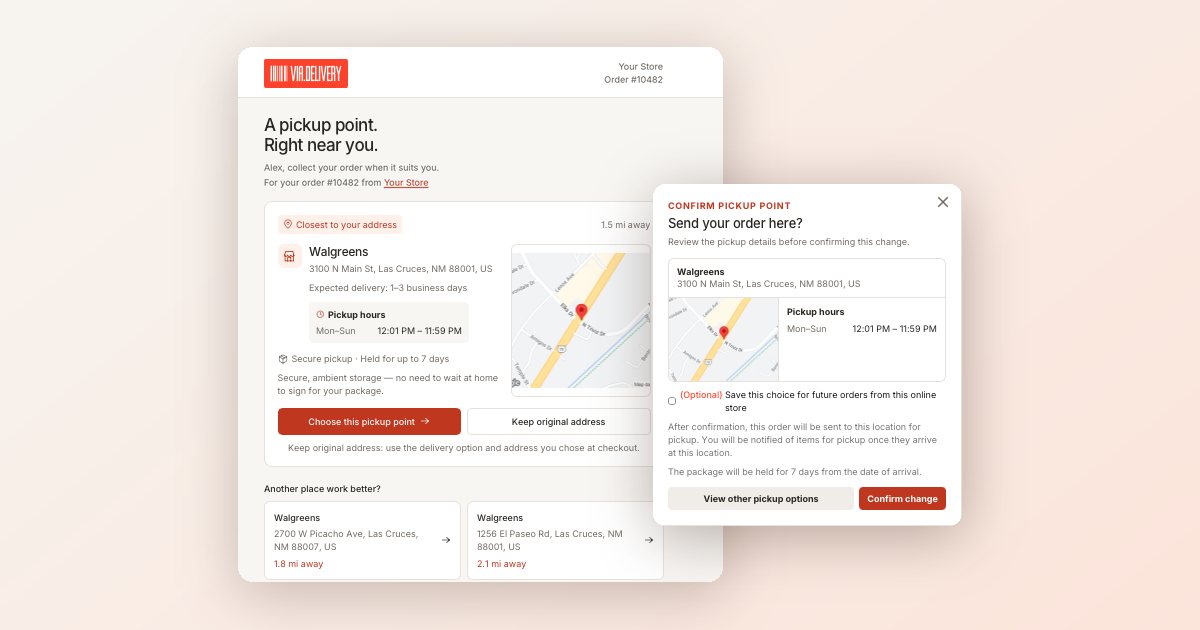 New Pickup Redirect Page for Wine Clubs and SubscriptionsVia.Delivery's redesigned pickup redirect page lets wine club members and subscribers move an order to a nearby pickup…Read the article →
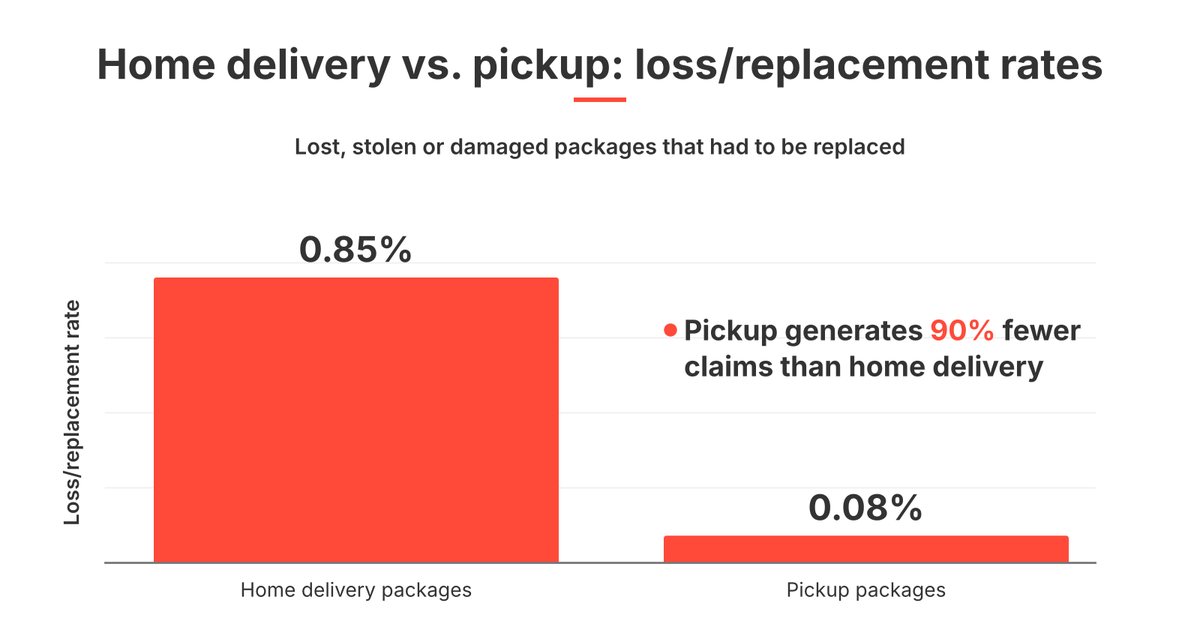 Holiday Package Theft: Pickup Orders Had 90% Fewer ClaimsLost and stolen package claims peak in Nov–Dec. In Perry Ellis order data, 0.85% of home deliveries needed replacing vs 0.08%…Read the article →
 Residential and Delivery Area Surcharges 2027: UPS vs FedEx2027 residential and delivery area surcharges at UPS and FedEx, the 2,533 ZIPs FedEx moves to Remote, how fuel applies on top…Read the article →
Not ready for a call?
Get the Via.Delivery Shipping Brief: short reads on carrier fees, holiday cutoffs and pickup options for online stores and wineries, twice a month.
No spam. Unsubscribe anytime.